Appointment booking
Appointment booking right inside the chat.
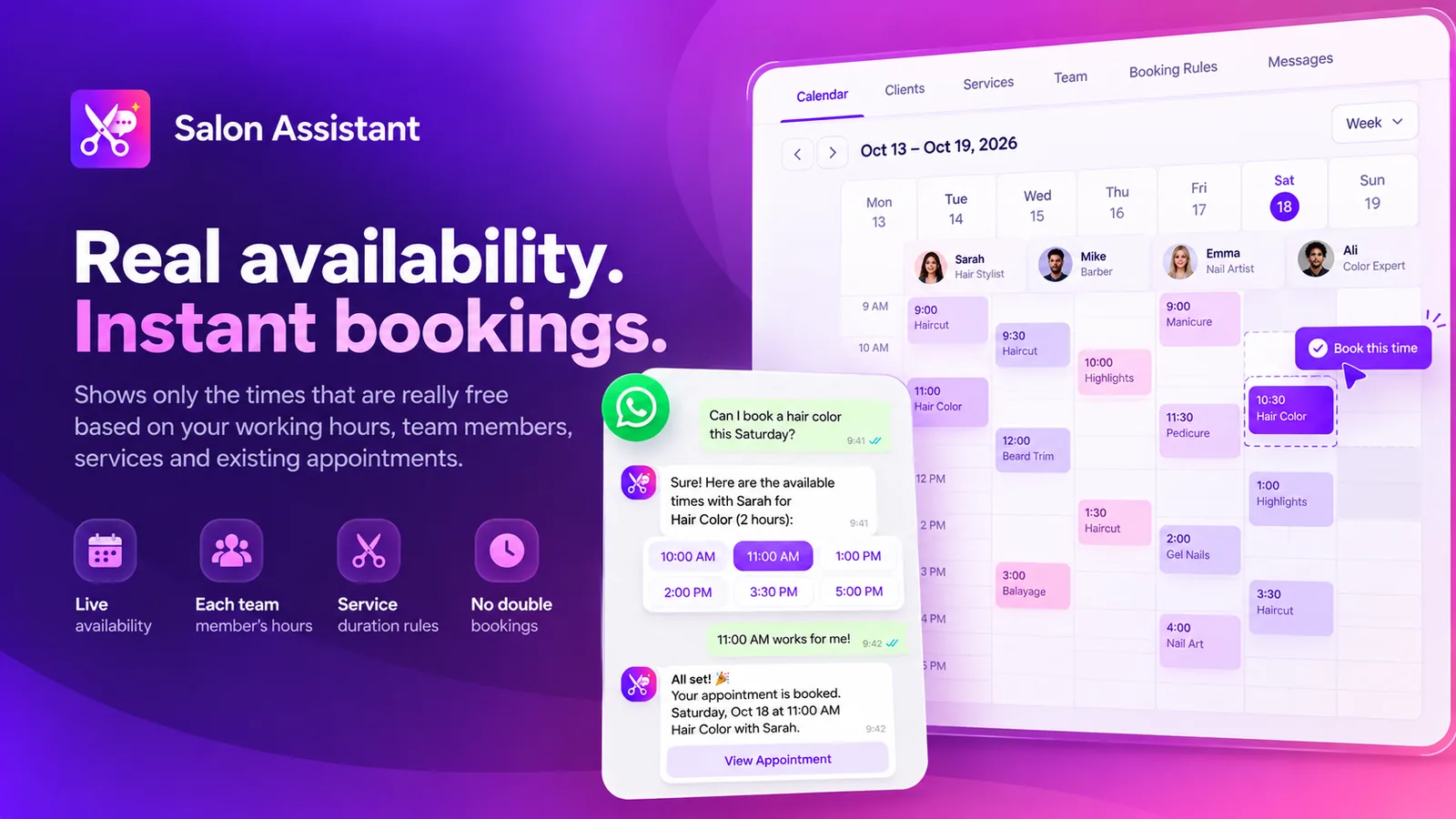
Your AI assistant answers questions, offers only times that are really free and books the appointment in the conversation. Reminders go out on WhatsApp with buttons to confirm, change or cancel, and every booking lands in a calendar inside MonoChat.
Or start with $150 of credit, enough for a first month of Growth
- Web chat
- Reminders with buttons
- Calendar in MonoChat
Hi, can I book a haircut with Mia this week?
21:14
Of course! Mia is free on Thursday at these times:
21:14
Thu 14:30
21:15
Haircut with Mia
Thursday, 14:30
45 min
You are booked. We will remind you the day before.
21:15
Apps that book
Pick the booking app for your business
Ready-made assistants in the MonoChat Store, each set up for how one kind of business takes bookings.
-
Salon Assistant
Appointments with a team member, a week calendar and reminders the day before. -
Clinic Assistant
Appointments by doctor or call-backs, reminders and questions before the visit. -
Studio Assistant
Classes and free trials, with a waitlist when a class is full and class reminders. -
Garage Assistant
Test drives and workshop visits with reminders. -
Real Estate Assistant
Property viewings with reminders and feedback afterwards. -
Hotel & Travel Assistant
Stays, tours, restaurant tables and airport transfers. -
Rental Desk Assistant
Car rental bookings with pick-up and return reminders. -
School Assistant
Trial lessons and placement tests with reminders. -
Citizen Services Assistant
Office appointments for municipalities and public institutions. -
Store Assistant
Click & collect reservations with a reminder before the hold ends. -
MonoChat Toolkit
Find free appointment times and Book an appointment tools for your own AI assistant.
How it works
From the first question to the visit
The same building blocks run behind every booking app, whatever you sell.
-
Books in the conversation
The assistant answers from your own services and rules, offers free times and books the appointment without sending the customer to a form.
-
Instant or confirmed by your team
Depending on the app, bookings are confirmed at once or arrive as requests your team confirms with one tap.
-
Reminders that get answered
WhatsApp template reminders with buttons, so customers confirm, change or cancel on the spot and fewer people miss the visit.
-
A calendar inside MonoChat
Every booking app has its own calendar or planner in MonoChat, next to the conversations, so your team sees bookings where they chat.
-
Bookings taken by phone too
In apps like the Salon Assistant, bookings you take at the desk or on the phone go in the same calendar, and customers still get the confirmation and reminders on WhatsApp.
-
Handover to a person
When a question needs your team, the assistant hands the conversation over with the full history in the shared inbox.
Reminders
Reminders with Confirm, Reschedule and Cancel
Reminders and follow-ups are sent as approved WhatsApp templates. The Salon Assistant sends one the day before with Confirm, Reschedule and Cancel; the Clinic Assistant asks a few hours before with I’ll be there, Change the time and Cancel.
- Templates are submitted for approval when you turn the assistant on
- Answers come back into the same conversation
- Changes inside your cancellation window go to your team
- Class, viewing, pick-up and return reminders in other apps
Hi Sara, a reminder of your haircut with Mia tomorrow at 14:30. See you then?
10:00
Reschedule
10:07
No problem. Mia is also free on Friday at 11:00 or 16:00.
10:07
Fri 16:00
10:08
Done, moved to Friday at 16:00.
10:08
Your desk
Calendars and desks inside MonoChat
Each booking app comes with its own screens in MonoChat: a calendar or planner, the list of bookings and customers, settings for services, people and booking rules, and reports such as no-shows with and without reminders.
- Week calendar coloured by team member in the Salon Assistant
- Classes and a waitlist in the Studio Assistant
- The customer’s next booking beside the chat
- Reports on bookings, no-shows and reminders
How to start taking bookings in the chat
Four steps, and nothing goes to customers until you turn it on.
-
Connect your channels
Connect WhatsApp, Instagram or your website chat to MonoChat.
-
Install a booking app
Pick the app for your business from the MonoChat Store and install it in your workspace.
-
Add services, people and hours
Fill in your services, team, opening hours and booking rules in the app.
-
Turn the assistant on
Turning it on starts booking and submits the reminder templates on your WhatsApp number for approval.
Booking by industry
See how booking in the chat works for your sector.
-
WhatsApp appointment booking for salons
Bookings, reminders and rebooking for beauty salons. -
Appointment booking assistant for clinics
Patient appointments and call-backs in every language. -
Class booking on Instagram
Classes and trials for fitness, pilates and yoga studios. -
Test drive booking
Test drives booked from the chat for car dealers. -
Property viewing booking
Viewings with reminders for real estate agencies. -
WhatsApp reservation assistant
Stays, tables and tours for hotels and travel. -
WhatsApp car rental booking
Rentals with pick-up and return reminders. -
Municipal appointment booking
Office appointments for public services.
FAQ
Appointment booking FAQ
What the booking apps do and where bookings are kept.
On which channels can customers book?
The booking apps take bookings in the chat on WhatsApp, Instagram and your website chat. Confirmations and reminders go out on WhatsApp. In apps like the Salon Assistant, that includes bookings your team adds by phone or at the desk.
How do reminders work?
Reminders are approved WhatsApp templates with buttons. For example, the Salon Assistant sends one the day before with Confirm, Reschedule and Cancel, and the Clinic Assistant sends one hours before with I’ll be there, Change the time and Cancel. The app submits the templates when you turn the assistant on.
Where are bookings stored? Does it sync with Google Calendar or Outlook?
Bookings live in the app’s own calendar inside MonoChat. There is no built-in Google Calendar or Outlook sync. If you need bookings in an external calendar or booking system, you can connect it with custom functions and the MonoChat API.
Can my team confirm bookings before they are final?
In many apps you choose. The Garage, Real Estate, Rental Desk and Hotel & Travel assistants, for example, can take bookings as requests your team confirms with one tap, or confirm them instantly when there is room.
My business is not on the list. Can I still book in the chat?
Yes. The MonoChat Toolkit adds Find free appointment times and Book an appointment tools to your own AI assistant, and the requests appear under Requests › Appointments. The Toolkit does not send reminders.
Does the assistant replace my team?
No. It handles the routine bookings and questions, and hands a conversation to your team when needed, with the full history in the shared inbox.
Keep exploring
-
Unified Team Inbox
Manage all customer conversations across channels in one inbox. -
Workflow Automation
Build event-driven customer journeys with smart automation. -
AI Assistants & ChatBots
Deploy AI assistants that answer, guide and qualify customers. -
Multi Agent Call Center
Route conversations to agents with ownership, SLAs and visibility. -
Business Intelligence
Track conversations, teams, campaigns and AI performance. -
Roles & Permissions
Custom roles that decide what each person can see and do.
First month of Growth on us
Let customers book while they chat
Install a booking app, add your services and hours, and turn on reminders that customers answer with one tap.
One code per business • 30 days to redeem • No card needed