Property Listings on WhatsApp
Property Listings on WhatsApp Photos, Prices and a Button to View
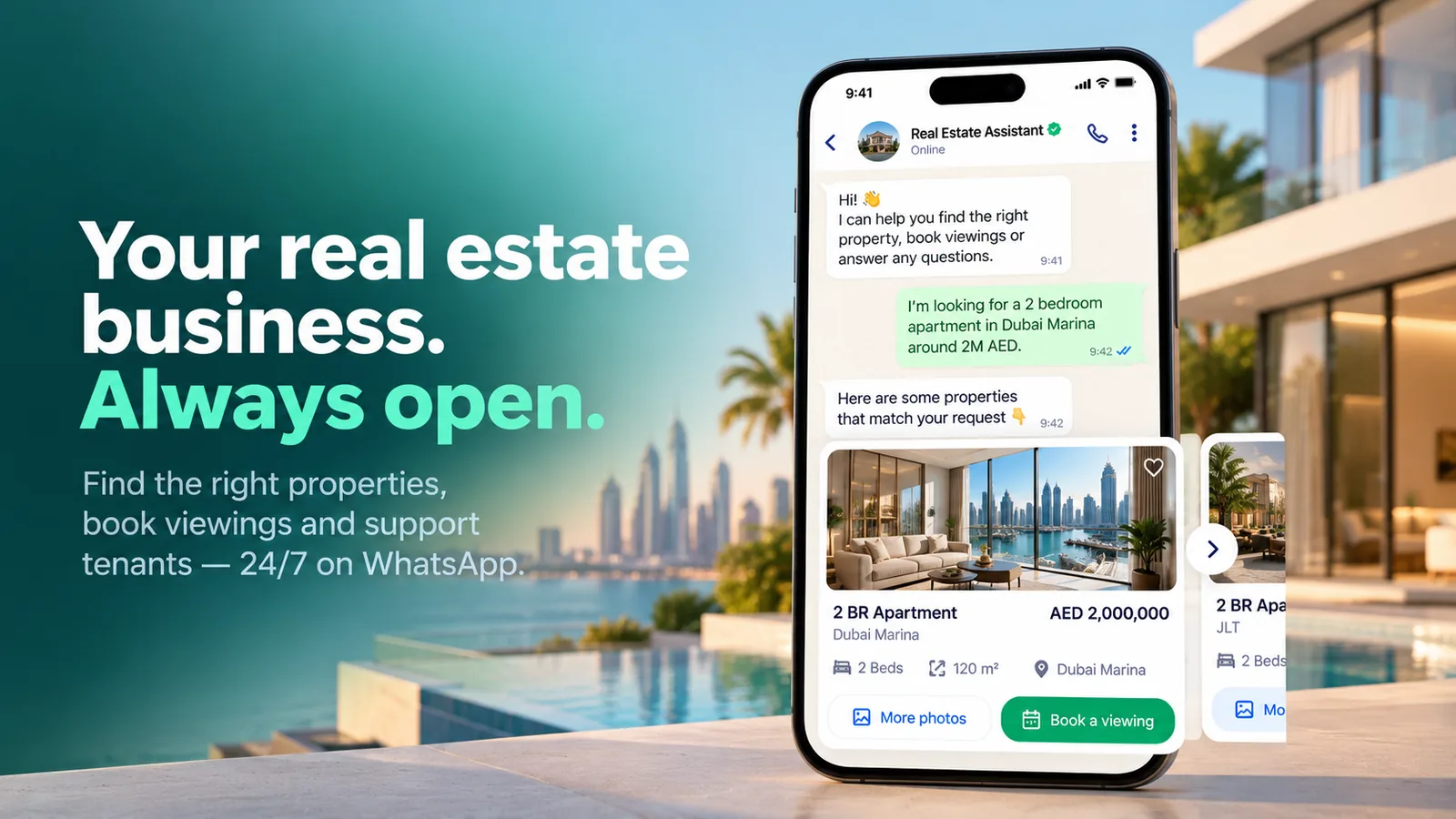
Instead of a portal link and a wall of text, send matching properties as WhatsApp carousels: a photo, the price and the key facts on each card, with buttons to see more or book a viewing.
Or start with $150 of credit, enough for a first month of Growth
- Carousel messages
- Brochures and floor plans
- Saved-search alerts
Do you have 3-bed flats in Riverside under €450,000?
20:41
3-bed flat · Riverside Park
118 m² · 2 bathrooms · balcony
€439,000
We have two that match. Swipe to compare:
20:41
3-bed flat · Old Mill Quarter
124 m² · 2 bathrooms · parking
€445,000
20:41
More photos of the Old Mill one, please
20:43
Old Mill Quarter · gallery
16 photos · floor plan · video tour
Opens in your browser
Here is the full gallery. Would you like to see it this week?
20:43
WhatsApp listing sharing features
Send the right properties in a format people actually open, and turn interest into a viewing.
-
Carousel listing cards
Several properties in one message, each with a photo, price, key facts and its own buttons.
-
Matching by search criteria
The assistant filters your live inventory by area, budget, bedrooms and type before sending.
-
Brochures and floor plans
Send PDFs, floor plans and video tour links in the chat when a buyer asks for them.
-
Saved-search alerts
Buyers who opt in receive new listings and price drops that match their search through approved templates.
-
Instagram and Messenger replies
Answer price questions from social posts with the listing card and move the buyer to the next step.
-
Interest tracking
Every listing a buyer opens or asks about is saved on the contact, so agents know what to suggest next.
Carousel messages
A shortlist buyers can swipe through
WhatsApp carousel messages show several properties side by side, each with its own image and buttons. Buyers compare without opening a browser, and every tap tells your agent which listing they want.
- Photo, price and key facts on every card
- "More photos" and "Book a viewing" buttons per property
- Taps saved on the contact for follow-up
New listing alert
WhatsApp template · saved search
Message preview
Hi Laura, a new 2-bed flat in Riverside matches your search: 96 m², balcony, 5 minutes to the station, €389,000. Tap to see the photos or book a viewing.
Ready-made app in the MonoChat Store
Real estate
Real Estate Assistant
An AI front desk for real estate agencies that sends matching listings as WhatsApp cards, books viewings with reminders, tracks where every lead comes from, runs project launch campaigns, and handles tenants’ rent, documents and repairs.
How to share property listings on WhatsApp
Three steps from inventory to viewing.
-
Connect your listings
Give MonoChat your listings through the API, a feed from your CRM or website, or the knowledge base.
-
Match and send
The assistant asks what the buyer wants and sends matching properties as carousel cards, PDFs or alerts.
-
Turn taps into viewings
Buttons on each card lead straight to viewing booking or a handover to the agent.
Example conversations
Examples of sharing property listings on WhatsApp
New-listing alerts, floor plans on request and replies to social posts, each with a clear next step.
-
New listing alert for a saved property search
A buyer with a saved search hears about a new flat the morning it is listed, opens the gallery and moves straight to a viewing.
Atlas Realty Business accountNew: 2-bed flat · Riverside
96 m² · balcony · 5 min to the station
€389,000
Hi Laura, a new flat matching your search has just been listed.
09:00
See photosBook a viewingStop alertsSee photos
09:14
Riverside flat · photo gallery
12 photos · floor plan · 3D tour
Opens in your browser
Here are all 12 photos and the floor plan.
09:14
Book a viewingBook a viewing
09:20
Thursday 18:00 or Saturday 11:00?
09:20
Thu 18:00Sat 11:00 -
Sending a floor plan and comparing units in web chat
A website visitor gets the floor plan as a PDF, an instant answer about parking from the listing data and a side-by-side comparison of two units.
Lumen Homes Typically replies instantlyCan I get the floor plan for unit B-12?
16:02
Unit B-12 floor plan.pdf
2 bedrooms · 104 m² · south-facing
PDF · 1.8 MB
Here is the floor plan for B-12.
16:02
Is a parking space included?
16:03
Yes, B-12 comes with one underground parking space and a storage room on level -1.
16:03
Compare with B-14Talk to an agentCompare with B-14
16:04
B-12 vs B-14
104 m² vs 112 m² · 4th vs 6th floor
€412,000 vs €446,000
B-14 is larger and has a corner terrace. Shall I book a viewing of both on the same visit?
16:04
Yes, book both -
Replying to a price question from an Instagram post
Someone asks the price of a villa from a post; the DM reply carries the listing card, a similar option and a callback from the agent.
Atlas Realty Business accountWhat's the price of the villa in your last post?
21:15
4-bed villa · Pine Hills
260 m² · 600 m² plot · private pool
€1,150,000
Hi! Here are the details of the villa from our post.
21:15
More photosSimilar villasBook a viewingSimilar villas
21:16
4-bed villa · Cedar Valley
240 m² · garden · 2 km from the beach
€980,000
Here is one with a similar layout at a lower price.
21:16
More photosBook a viewingCan someone call me tomorrow?
21:18
Of course. Hannah will call you tomorrow morning; I have shared both villas with her.
21:18
FAQ
Sharing property listings on WhatsApp: common questions
Quick answers to the most common questions.
How do I send property listings on WhatsApp?
With the WhatsApp Business API you can send listings as carousel messages, where each card has a photo, text and buttons, or as single listing messages, PDFs and links. MonoChat lets you send them from the shared inbox, from a flow or automatically from your systems.
What is a WhatsApp carousel message?
A carousel is one message containing several horizontally scrollable cards, each with its own image, text and buttons. In real estate it works well for a shortlist of properties the buyer can compare inside the chat.
Can I send listing alerts to buyers with a saved search?
Yes, to buyers who have opted in. When a new property or a price change matches their criteria, an approved WhatsApp template message can be sent automatically with the listing details and buttons.
Can the chatbot pick listings that match what the buyer asked for?
Yes. The AI assistant can read listing information from your knowledge base, or query your CRM or website through custom functions, and send only properties that match the area, budget and size the buyer gave.
Can I send brochures and floor plans in the chat?
Yes. PDFs, images and links can be sent in the conversation, so brochures, floor plans and video tours reach the buyer where they are already talking to you.
Keep exploring
-
Real Estate Lead Qualification
Qualify portal and ad leads on WhatsApp in the first minute. -
Property Viewing Booking
Book viewings with the right agent and send reminders. -
Off-Plan Project Launch Campaigns
Announce new projects and collect expressions of interest. -
Tenant Maintenance Requests
Log repair requests with photos and keep tenants updated. -
Rent Payment Reminders
Send rent reminders with payment links and receipts.
First month of Growth on us
Send Listings Buyers Actually Open
Share properties as WhatsApp carousels, send floor plans on request and alert saved searches with MonoChat.
One code per business • 30 days to redeem • No card needed