Lead Ads
Facebook and Instagram Lead Ads followed up on WhatsApp in minutes
Turn on lead forms for your Facebook page and every Facebook and Instagram Lead Ads form reaches MonoChat with its answers. The Lead Ads Follow-up app then messages each lead on WhatsApp with your approved templates, in up to three steps that stop when they reply.
Or start with $150 of credit, enough for a first month of Growth
- Facebook Lead Ads
- Instagram Lead Ads
- WhatsApp templates
- Stops on reply
Hi Daniel, thanks for asking about the Seaview flats. You chose 2 bedrooms and a move within 3 months. Shall we send you the floor plans?
18:04
Yes, send them
18:09
Great, Elif from our sales team will send them here in a moment.
18:10
How leads reach MonoChat
Lead forms on your Facebook page channel
Lead Ads let people send their details through a form inside Facebook or Instagram, without leaving the app. Switch on Lead forms for your Facebook page in MonoChat and every new lead arrives with the form’s answers. Instagram Lead Ads come in through the Facebook page linked to your Instagram account.
- Settings › Channels › your Facebook page › Lead forms
- Facebook and Instagram Lead Ads forms
- Name, email, phone and your own questions
- Ready for the Lead Ads Follow-up app
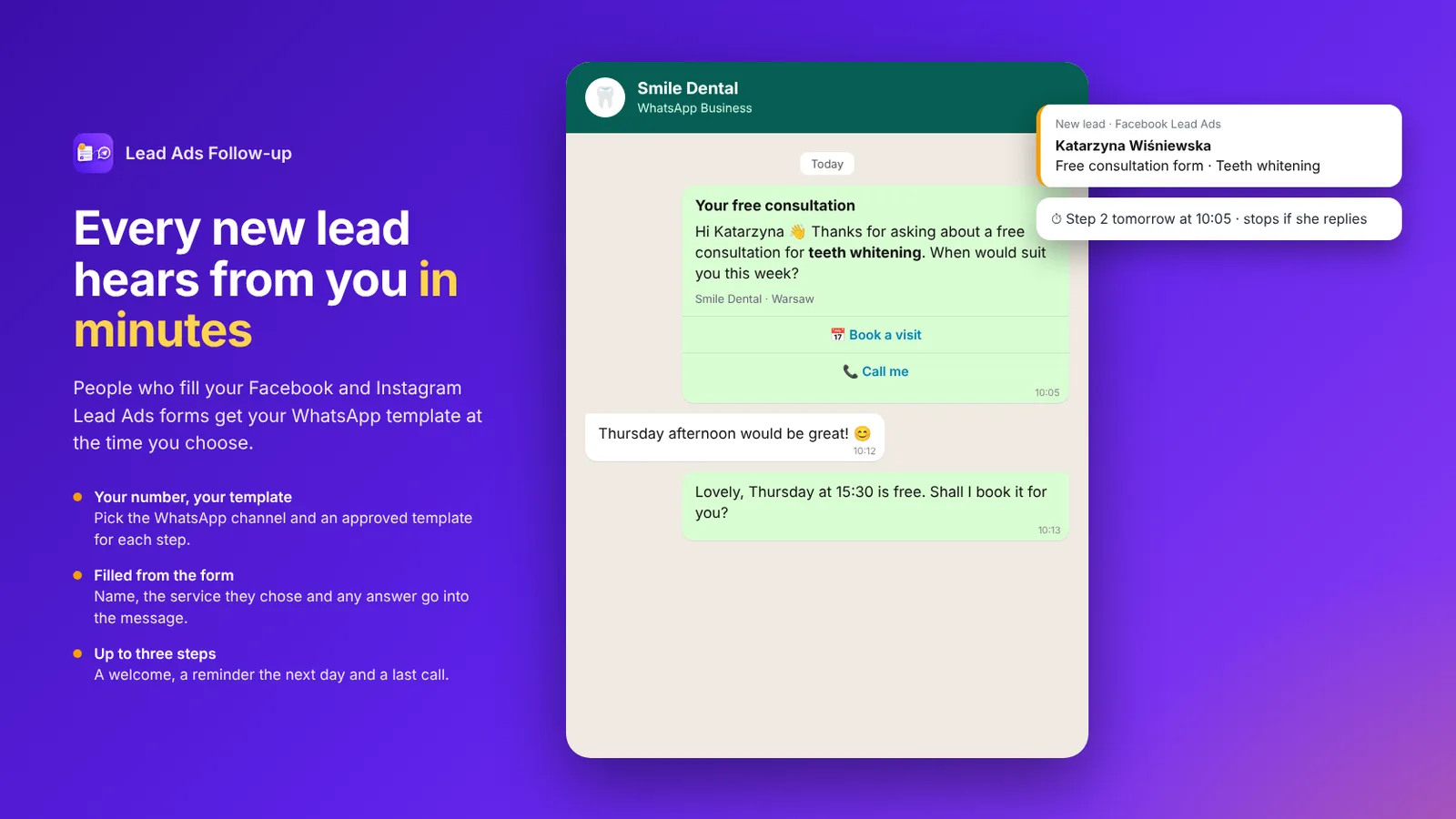
Lead Ads Follow-up
A WhatsApp follow-up for every form
The Lead Ads Follow-up app reads new leads every minute and sends your follow-up on WhatsApp, by the rules you set.
-
Rules per page, form or ad
Give each page, form, form name or ad name its own follow-up, WhatsApp number and templates.
-
Up to three steps
For example a welcome a few minutes after the form, a reminder the next day and a last message after three days. Waits can be minutes, hours or days.
-
Stops when they reply
As soon as the lead replies, the remaining steps stop, so nobody gets a reminder in the middle of a conversation.
-
Templates filled from the form
Fill template variables from the form’s answers, such as the name or the service chosen, or from the form or ad name.
-
Send window and skip rules
Messages outside your send hours wait for the next opening. Skip leads by tag, when your team is already handling them, or when the number got a message recently.
-
Desk and reports
See leads waiting, what was sent and when, who replied and why a message did not go, plus leads, messages and replies per rule and form.
Ready-made app in the MonoChat Store
Marketing
Lead Ads Follow-up
Sends WhatsApp template messages to people who fill your Facebook and Instagram Lead Ads forms, after the delay you choose, from the channel and template you pick, and stops when someone on your team or the customer has already taken over.
Test mode
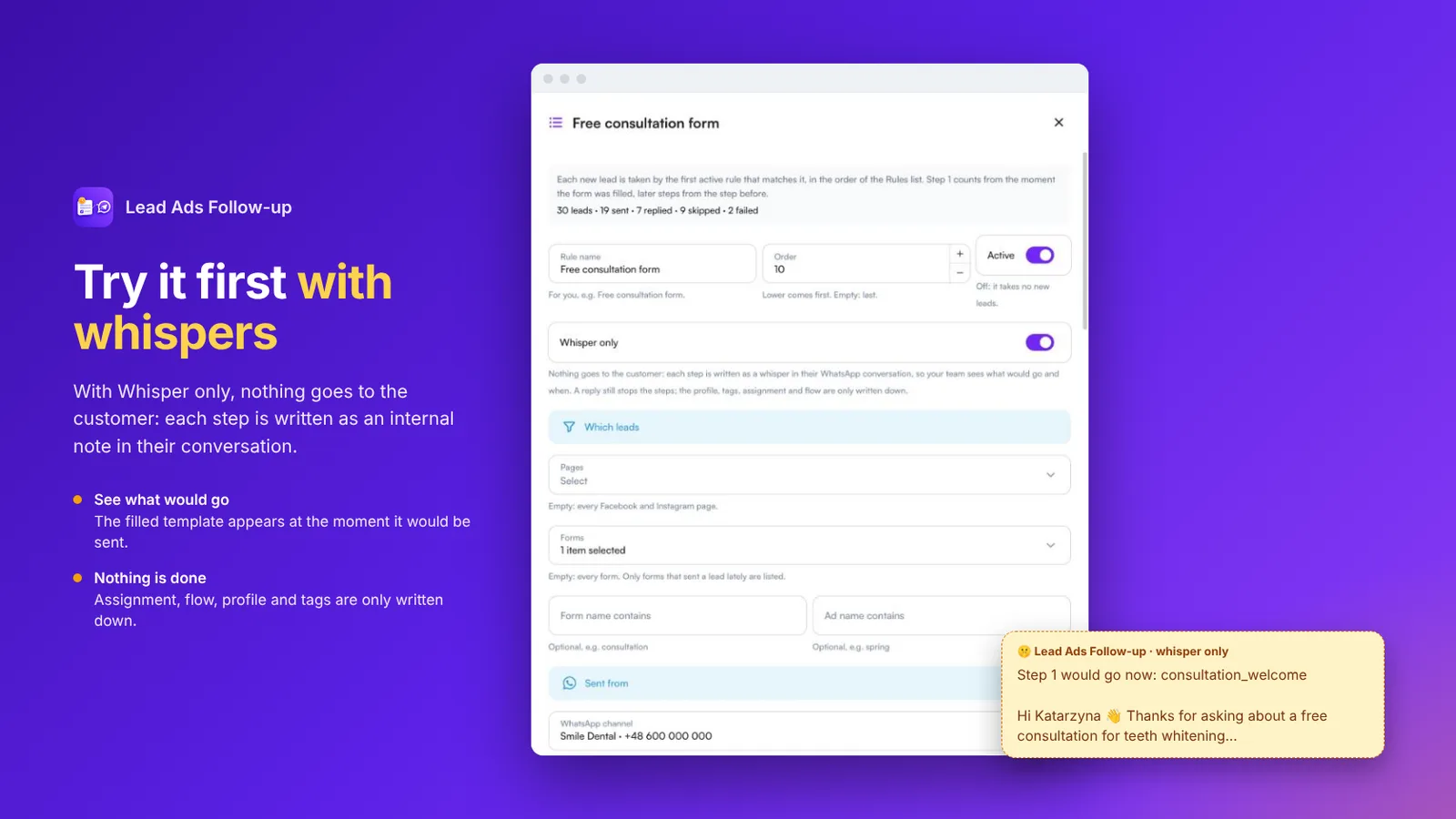
Try it first with Whisper only
Turn on Whisper only on a rule and nothing goes to the lead. Each step is written as an internal note in their WhatsApp conversation at the moment it would have gone, with the filled template, so you can check the timing and wording before you switch it on.
- Internal notes instead of messages
- Real timing and filled templates
- A test button sends any step to your own number
When the lead replies
Hand the reply to the right person or flow
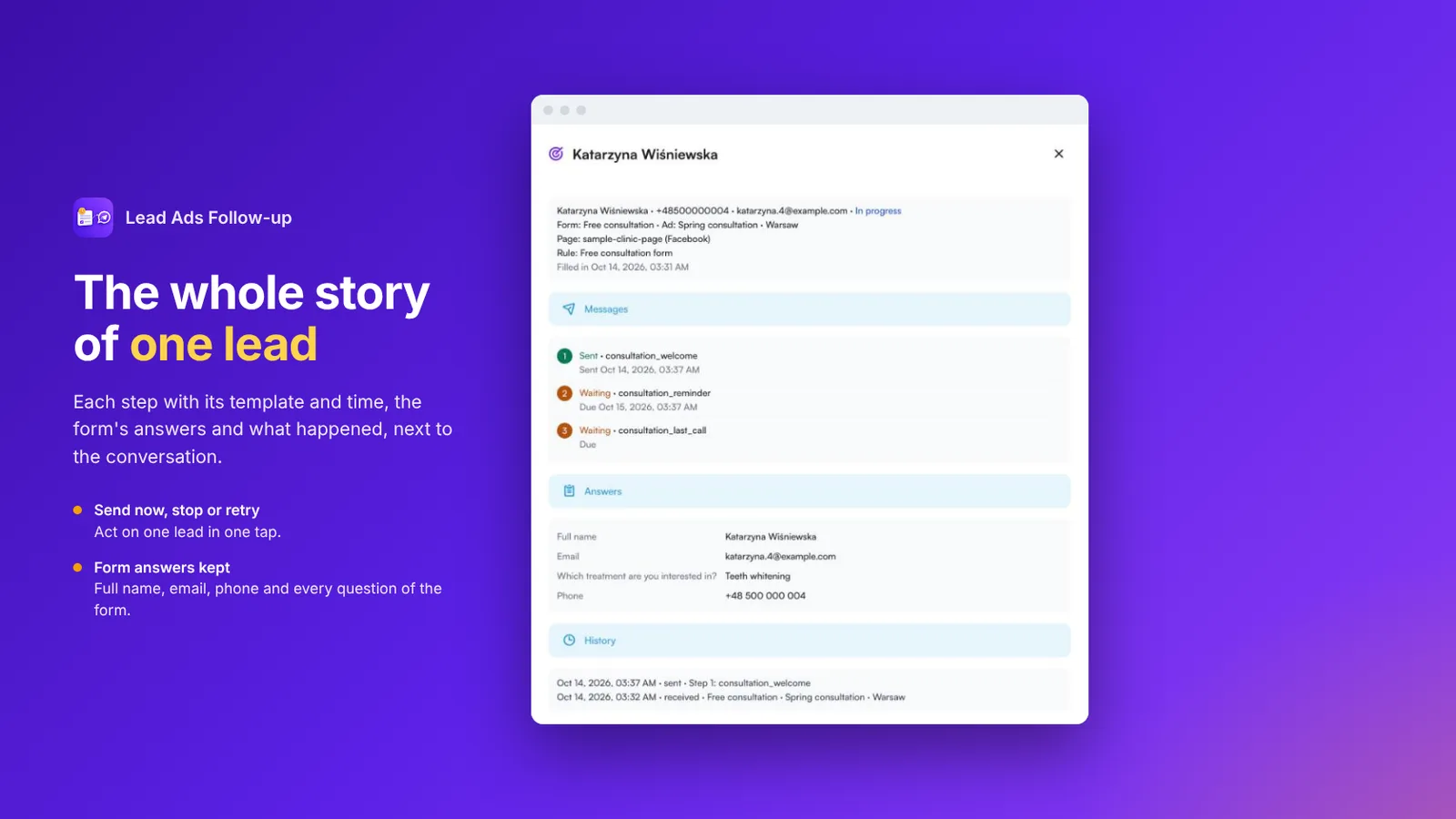
The app can also fill the customer’s profile and a note from the form’s answers and add tags. When the lead replies, it can assign the conversation to a team or a person, or start one of your flows, for example your AI assistant.
- Profile and note filled from the form
- Tags for campaign and interest
- Assign to a team or person on reply
- Start a flow or your AI assistant on reply
How to follow up Lead Ads on WhatsApp
Four steps from your Facebook page to WhatsApp messages that go out by themselves.
-
Switch on Lead forms
In MonoChat, open Settings › Channels › your Facebook page and switch on Lead forms.
-
Have WhatsApp templates approved
Connect your WhatsApp number and get the templates you want to send approved by Meta.
-
Install Lead Ads Follow-up
Install the app and create a rule: page, form or ad, WhatsApp number, up to three steps and when not to send.
-
Test, then turn it on
Use Whisper only or the test button to see what would go, then switch the rule on.
Lead Ads follow-up by industry
Wherever a form is the first step, a fast WhatsApp message is the second.
-
Real estate
Project and listing leads get plans and a viewing offer. -
Healthcare
Treatment enquiries get a reply and a call-back offer. -
Education
Course leads get program details and a trial lesson offer. -
Automotive
Model and test drive leads hear from a salesperson. -
Tourism & hospitality
Package enquiries get dates and prices on WhatsApp.
FAQ
Lead Ads FAQ
How Facebook and Instagram Lead Ads work with MonoChat.
How do I get Lead Ads into MonoChat?
Connect your Facebook page, then open Settings › Channels › your page and switch on Lead forms. New leads from your Facebook and Instagram Lead Ads forms then reach MonoChat with their answers.
Does it work with Instagram Lead Ads?
Yes. Instagram Lead Ads come in through the Facebook page linked to your Instagram account, the same way as Facebook ones.
Does every lead automatically start a WhatsApp conversation?
Not by itself. Lead forms bring the lead and its answers into MonoChat. The Lead Ads Follow-up app is what sends the WhatsApp messages, by the rules you set, and it can assign the conversation or start a flow when the lead replies.
How many messages does a lead get?
Up to three steps per rule, each an approved WhatsApp template with its own wait. The remaining steps stop as soon as the lead replies.
Can I test without messaging real leads?
Yes. With Whisper only, each step is written as an internal note in the lead’s WhatsApp conversation instead of being sent, and a test button sends any step to your own number.
Are leads from before I switched it on messaged?
No. Leads that came in before the app was switched on are not messaged.
Keep exploring
-
Facebook Messenger Chatbot
Build a Facebook Messenger chatbot that answers from your own content 24/7, qualifies leads, shares products and hands chats to your team. -
Facebook Comment Auto-Reply
Auto-reply to Facebook comments with a public reply and a private Messenger message, triggered by keywords, then tag, assign and qualify every lead. -
Click-to-Messenger Ads
Answer Click-to-Messenger ad conversations instantly: no-code flows qualify leads, an AI chatbot replies 24/7 and your team closes the sale in one inbox. -
Messenger Marketing Messages
Send Messenger marketing messages to opted-in subscribers with MonoChat: campaigns outside the 24-hour window, automated reply flows and one shared team inbox.
First month of Growth on us
Reach every lead while the ad is still fresh
Switch on lead forms, install Lead Ads Follow-up and send your first WhatsApp follow-up within minutes of the form.
One code per business • 30 days to redeem • No card needed