Facebook Business
Facebook Messenger Automation Social Selling and Support in One Inbox
Strengthen your Facebook Business profile with MonoChat. Communicate via Messenger, automate replies, and convert chats into sales.
Or start with $150 of credit, enough for a first month of Growth
- Messenger inbox
- Comment-to-DM
- Product catalog
- AI replies
Hi! I found your page. Do you have running shoes in size 42?
11:32
Runner Pro · Size 42
In stock · 3 colours
Free delivery this week
Yes! Here is our best seller in size 42. Shall I reserve a pair for you?
11:32
Reserve the black one, please.
11:33
Done. The black pair is reserved for you. I am sending the checkout link now.
11:33
Facebook Messenger Features for Business
Use the full power of Facebook for your business with MonoChat
-
Official Business Profile
Build trust with your customers using your Facebook Business presence
- Verified business profile
- Business information and contact details
- Business hours and location information
- Automated greeting messages
-
Product Catalog
Showcase and sell your products on Facebook
- Visual product catalog
- Price and stock information
- Category-based organization
- Quick product sharing
-
Messenger Integration
Talk to customers instantly via Facebook Messenger
- Bot + human handoff
- Auto-replies and routing
- Live support line
- Customer segmentation
-
Facebook Insights
Track performance with analytics and reporting
- Engagement stats
- Audience analytics
- Sales performance reports
- ROI tracking
-
Comment Management
Convert comments to DMs and respond faster at scale
- Comment-to-DM conversion
- Public replies
- Automated comment responses
- Moderation tools
-
Facebook & Instagram Lead Ads
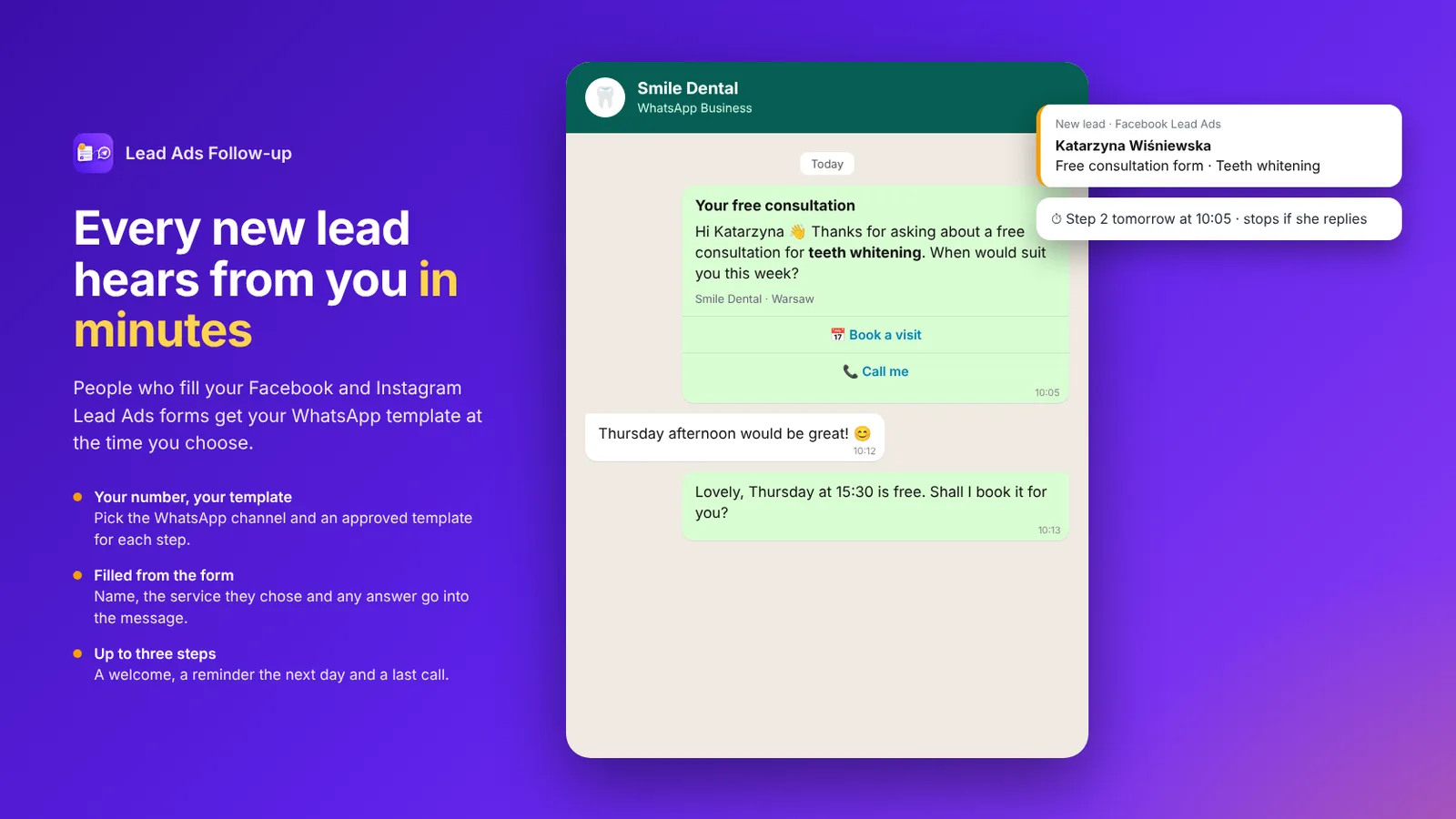
Turn on lead forms for your Page and every Lead Ads form reaches MonoChat. Follow up on WhatsApp within minutes with the Lead Ads Follow-up app.
- Form answers saved in MonoChat
- WhatsApp follow-up in up to three steps
- Follow-ups stop when the lead replies
Shared Messenger inbox
One team inbox for your Facebook Page, Messenger and comments
Page messages and comments land in the same inbox as your other channels, so agents see one customer history and never answer twice.
- Several agents reply from the same Facebook Page
- Assignment, routing and tags for every conversation
- Comment-to-DM flows that continue in Messenger
- AI replies with handoff to a live agent
Team inbox
All channels-
 Omar H. · Messenger Please reserve the black pair.
 -
 Sara A. · WhatsApp Is the linen shirt available in medium?
 -
 Deniz K. · Instagram Can I book for Friday at 6pm?
 - Website visitor · WebChat Which plan fits a team of five?
-
 Lina M. · TikTok Do you deliver tomorrow?
How to Connect Facebook Messenger to MonoChat
Start selling with Facebook Business in 4 simple steps
-
Connect Facebook
Connect your Facebook Page and Business assets to MonoChat
-
Integrate Messenger
Bring Messenger into a single inbox and route chats to the right team
-
Add Your Catalog
Sync or add products so customers can browse and request items in chat
-
Sell & Support
Automate replies, qualify leads, and convert chats into orders
Go deeper
Facebook Business features in detail
Each capability has its own guide with examples, setup steps and FAQs.
-
Facebook Messenger Chatbot
Build a Facebook Messenger chatbot that answers from your own content 24/7, qualifies leads, shares products and hands chats to your team. -
Facebook Comment Auto-Reply
Auto-reply to Facebook comments with a public reply and a private Messenger message, triggered by keywords, then tag, assign and qualify every lead. -
Click-to-Messenger Ads
Answer Click-to-Messenger ad conversations instantly: no-code flows qualify leads, an AI chatbot replies 24/7 and your team closes the sale in one inbox. -
Lead Ads to WhatsApp
Follow up every Facebook and Instagram Lead Ads lead on WhatsApp within minutes, with approved templates that stop when they reply. -
Messenger Marketing Messages
Send Messenger marketing messages to opted-in subscribers with MonoChat: campaigns outside the 24-hour window, automated reply flows and one shared team inbox.
Ready-made app in the MonoChat Store
Marketing
Lead Ads Follow-up
Sends WhatsApp template messages to people who fill your Facebook and Instagram Lead Ads forms, after the delay you choose, from the channel and template you pick, and stops when someone on your team or the customer has already taken over.
FAQ
Facebook Business & Messenger FAQ
Answers about connecting Facebook Page, Messenger, comment-to-DM, catalog, automation, and insights in MonoChat.
What can I connect with MonoChat for Facebook?
You can connect your Facebook Page and Messenger to MonoChat to manage conversations in a shared inbox, automate replies, route chats to teams, and track performance with analytics.
Does MonoChat support comment-to-DM automation?
Yes. You can automate workflows that turn post comments into private Messenger conversations (comment-to-DM), qualify leads, and continue the journey with bots or human agents.
Can multiple agents reply from the same Facebook Page?
Yes. MonoChat provides a team inbox with assignment and routing, so multiple agents can collaborate on the same Page while keeping ownership and visibility across conversations.
Can I share products and a catalog inside Messenger chats?
Yes. You can sync or add your product catalog and share products directly in chat, helping customers browse items, ask questions, and move faster toward purchase.
What automations can I build for Messenger?
Common automations include instant replies, FAQs, lead qualification, routing by intent, business-hour flows, campaign follow-ups, and handoff rules to live agents when needed.
How do I measure performance on Facebook and Messenger?
MonoChat includes analytics and reporting for engagement, response performance, and conversion-related metrics so you can understand what drives sales and support efficiency.
Will customers see responses as coming from my Page?
Yes. Replies are sent through your connected Facebook Page/Messenger identity, so customers experience a consistent brand presence while your team works in MonoChat.
How long does it take to set up?
Setup is typically quick: connect your Facebook Page, enable Messenger inboxing, configure routing/automation, then optionally add a catalog and comment workflows.
Keep exploring
-
WhatsApp Business API
Automate sales, support and customer journeys on WhatsApp. -
Instagram Business
Manage Instagram DMs, leads and customer conversations. -
TikTok Business
Manage TikTok DMs, comments and social engagement. -
Telegram Bot
Build Telegram bots and automate customer conversations. -
WebChat
Add a live chat and AI assistant widget to your website. -
Twilio
Send OTP, reminders, alerts and two-way SMS with Twilio.
First month of Growth on us
Increase Your Social Sales with Facebook Business
Bring your Facebook Page and Messenger into one inbox. Automate replies, convert comments to DMs, and sell faster with MonoChat.
One code per business • 30 days to redeem • No card needed