Explainer
What is an agent harness and why WhatsApp support needs one
Most AI in customer messaging is one question, one answer. An agent harness turns a language model into something that can work a case: plan, use tools, check its work and remember. Here is what that means, which harnesses exist today, and how to run one in MonoChat now.
Or start with $150 of credit, enough for a first month of Growth
Published:
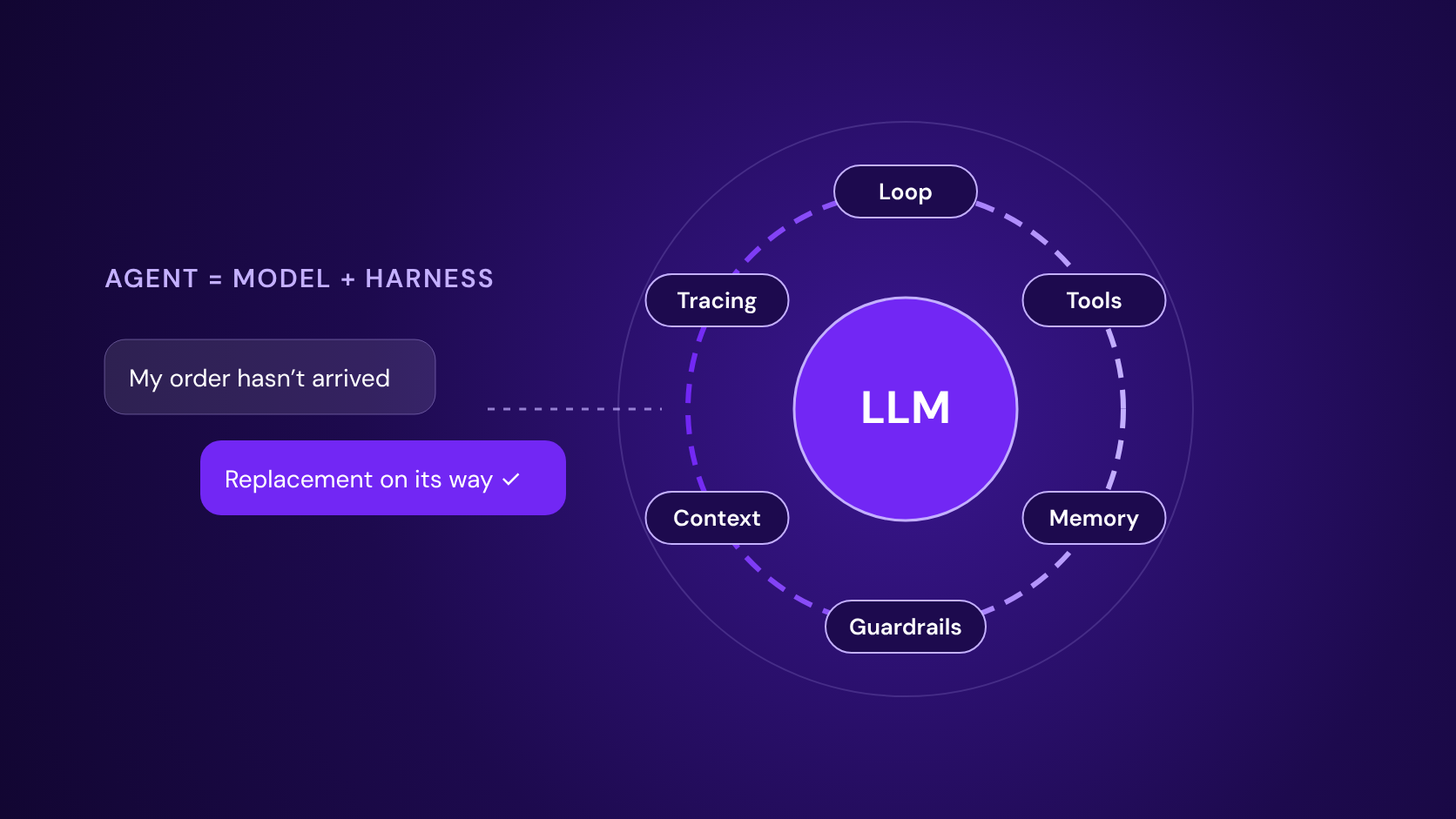
Over the last year the conversation around AI has quietly moved from models to what surrounds them. The same model can be a chatbot that answers one message, or an agent that resolves a delivery problem across three systems and two days. The difference is not the model. It is the harness.
This article explains the idea in plain terms, compares the harnesses you can use today, and shows how MonoChat now lets businesses run one on WhatsApp, Instagram, web chat and every other channel in their inbox.
What is an agent harness?
An agent harness is the software layer that wraps around a large language model and lets it act, not just reply. The model reasons and decides what to do next. The harness runs that decision, feeds the result back to the model and repeats until the job is done. A short way to put it: agent = model + harness.
The term became widely used once teams noticed that coding agents such as Claude Code and Codex owed much of their reliability to this surrounding layer rather than to the model alone. Anthropic, OpenAI, Google and Microsoft now ship their harnesses as products developers can build on.
What a harness is made of
- The loop: Reason, act, observe, repeat. The harness keeps going until the task is finished or it needs a person.
- Tools: Functions the model may call: check an order, look up a booking, issue a refund, search a knowledge base. Often connected through MCP.
- Memory and state: What happened earlier in this case, what the customer prefers and what has already been tried, kept across messages and sessions.
- Context management: Deciding what the model sees at each step and summarising (compacting) long histories so the important parts stay in view.
- Guardrails and approvals: Permissions, policies and human checkpoints for actions that cost money or cannot be undone.
- Sandbox and files: An isolated workspace where the agent can run code, prepare a document or calculate a quote without touching live systems.
- Tracing and evaluation: A log of every step and tool call, so teams can see why the agent did what it did and measure it over many runs.
Inference vs harness: what is the difference?
Inference is a single call to a model: you send a prompt, the model returns text, and the exchange is over. It is fast, cheap and predictable, and it is exactly right for many jobs, such as classifying a message, drafting a reply or summarising a conversation.
A harness runs many inference calls in a loop and adds everything around them: tools, memory, checks and limits. It is slower and uses more tokens per task, but it can finish work that needs several steps, outside data or a decision along the way.
| AI inference | Agent harness | |
|---|---|---|
| What it is | One request to a model, one response | A loop around the model that plans, acts and checks |
| Steps per task | One | As many as the task needs, within limits you set |
| Tools and systems | Optional, usually a single function call | Many tools, called and chained as the case requires |
| Memory | Only what is in the prompt | Case history and state kept across steps and sessions |
| When something fails | Returns whatever it produced | Notices the error, retries or asks a person |
| Best for | Classifying, drafting, summarising, single answers | Resolving cases, multi-step requests, follow-ups over days |
| Cost and speed | Lowest cost, near-instant | Higher token use, seconds to minutes per task |
In practice good teams use both: inference for quick, well-defined steps and a harness where the work genuinely needs several steps.
What a harness changes in WhatsApp customer support
Customer messaging is where the difference between answering and resolving shows most. A customer writes "my order hasn't arrived" and expects it to be sorted, not explained.
Cases are resolved, not just answered
The agent can look up the order, check the carrier, see that the parcel is stuck, open a claim and offer a replacement in the same conversation.
It checks before it promises
Stock, prices, appointment slots and policies are verified in your systems at the moment of answering instead of being guessed from training data.
It remembers the case
If the customer comes back tomorrow, the agent knows what was already tried and what was promised, even after the 24-hour WhatsApp window has closed.
It follows up over time
Long-running tasks, such as waiting for a refund to clear or a part to arrive, can continue and message the customer when something changes, using approved templates where WhatsApp requires them.
People stay in control
Refunds above a limit, cancellations or anything sensitive wait for a team member's approval, and handover to a person keeps the full history.
Every step is visible
Tool calls and decisions are logged, so supervisors can review why the agent acted and improve the instructions.
An example: a return on WhatsApp
- The customer sends a photo of a damaged item and asks for a return.
- The agent finds the order, checks that it is within the return period and reads the photo.
- It creates the return in your e-commerce system and books a courier pick-up for the next day.
- The refund is above the automatic limit, so it asks a team member to approve it inside the inbox.
- After approval it confirms to the customer, and two days later, when the courier scans the parcel, it sends the refund confirmation.
With inference alone this is a chatbot that explains the return policy. With a harness it is the return.
The agent harnesses you can use today
Several companies and open-source projects now offer a harness you can build on. They differ in who hosts them, which models they run and how much they include out of the box.
| Harness | By | Hosting and licence | Models | Highlights |
|---|---|---|---|---|
| Claude Agent SDK | Anthropic | Library (Python, TypeScript) | Claude | The harness behind Claude Code: tools, MCP, sub-agents, skills, context compaction, permissions |
| Claude Managed Agents | Anthropic | Hosted API (public beta since April 2026) | Claude | Anthropic runs the loop: sandboxed execution, long-running sessions, multi-agent work, tracing |
| OpenAI Agents SDK | OpenAI | Open source, MIT (Python first) | OpenAI models, others via adapters | Sandboxes from several providers, memory, MCP, skills, AGENTS.md, resumable runs |
| Codex | OpenAI | CLI open source (Apache 2.0) plus cloud | OpenAI models | Coding agent harness with an SDK for running it from your own services |
| Agent Development Kit (ADK) | Open source, Apache 2.0 (Python, Java, Go, TypeScript) | Gemini by default, model-agnostic | Multi-agent trees, MCP, Agent2Agent (A2A) protocol, built-in evaluation | |
| Agent Framework | Microsoft | Open source, MIT (Python, .NET) | Azure OpenAI, OpenAI, Anthropic and others | Harness stable since July 2026: tool loop, history, compaction, skills, approvals, OpenTelemetry |
| Deep Agents | LangChain | Open source, MIT | Model-agnostic | Planning, sub-agents, file system and context engineering on LangGraph |
| Pi | Earendil Works | Open source, MIT | Any provider, bring your own key | Deliberately minimal core (read, write, edit, shell) extended with shareable skills |
| Mastra | Mastra | Open source (TypeScript) | Model-agnostic | Agents with persistent threads, tool approvals and a local studio |
| OpenCode | OpenCode | Open source, MIT | Model-agnostic | Plan and build agents, SDK, terminal and desktop |
Details change quickly; check each project's documentation for the current state. Product names and logos belong to their owners.
Harnesses compared in this article


What about Meta's own Business Agent?
In 2026 Meta launched Meta Business Agent, its own AI agent for WhatsApp, Instagram and Messenger. It is, in effect, a harness that Meta builds and runs: it answers from your content, calls connected systems and hands over to your team.
It is a good option for many small businesses. It is also a closed system: you cannot choose the model, conversation data stays within Meta, some sectors such as finance and health are excluded, and since August 2026 it is billed per token, roughly 4 to 5 US cents per message by Meta's own estimate.
How the approaches compare
| Built-in AI agent of a messaging platform | Meta Business Agent | Agent Harness in MonoChat | |
|---|---|---|---|
| Choose the model | Usually fixed or a short list | No | Yes, any model you connect |
| Bring your own harness | No | No | Yes: Claude Agent SDK, OpenAI Agents SDK, Pi, hosted Claude and OpenAI agents, or your own (ADK, LangGraph and others via a custom endpoint) |
| Hosted option, no code | Yes | Yes | Yes |
| Your own tools and APIs | Limited integrations | Connectors | AI function tools, MCP, knowledge base and custom functions |
| Inside your flows and apps | Separate bot builder | Separate from your flows | An AI Agent node in flows and an agent-run API, next to AI inference |
| Handover to your team | Yes | Yes, with thread control | Shared inbox with full history and approvals |
| Where the data lives | Vendor platform | Meta | MonoChat plus the providers you choose |
Based on public product information in October 2026. Most messaging platforms we reviewed offer a built-in AI agent; we did not find one that lets a business either run a hosted harness or connect its own harness inside the same inbox and flows.
Agent harnesses in MonoChat, now available
MonoChat already lets you choose your language model and your vector database: use the ones we provide, or connect your own. Harnesses now work the same way.
Next to the AI inference you use today, MonoChat now has the AI Harness: a service definition you add once and use from the AI Agent node in any flow, or from the agent-run API. Drop the node into a flow, and the conversation is handed to an agent that can plan, use your tools and hand over to your team.
- Use MonoChat’s built-in harness, with no code, on the AI models you already have in MonoChat
- Or pick the Claude Agent SDK, OpenAI Agents SDK or Pi, run by MonoChat on your AI models with nothing extra to set up
- Use a hosted agent, the OpenAI Agents API or Claude Managed Agents, with your own OpenAI or Anthropic key
- Or connect your own harness, built on Google ADK, Microsoft Agent Framework, Deep Agents, LangGraph, CrewAI or your own code, with an endpoint URL and a shared secret
- Give it your tools: AI function tools, MCP servers, the knowledge base and custom functions
- Run it in flows on WhatsApp, Instagram, Messenger, Telegram, TikTok, web chat, SMS and voice
- Choose a main, a fallback and a fast model, set a budget per run, and hand over to your team in the shared inbox with the full history
- Mix it with inference: quick steps on a single call, complex cases on the harness
When to use inference and when to use a harness
- Use inference for one-step jobs: tagging, routing, translating, drafting a reply, summarising a chat.
- Use a harness when the customer's request needs several steps, data from your systems or a decision along the way.
- Start small: give the harness two or three tools and an approval rule, measure, then widen what it may do.
Now available in MonoChat
Agent Harness is now available in MonoChat. Create a free account, connect your channels, add an AI Harness and drop an AI Agent node into a flow to put your first agent to work.
See all harness providers, model roles and FAQ on the Agent Harness page
Run an agent harness on WhatsApp
Sources and further reading
- Databricks: What is an AI agent harness?
- Anthropic: Claude Agent SDK overview
- Anthropic: Claude Managed Agents overview
- OpenAI: The next evolution of the Agents SDK
- Google: Agent Development Kit
- Microsoft: Agent Framework documentation
- LangChain: Deep Agents
- WhatsApp Business: Introducing Meta Business Agent
- Meta: WhatsApp Business Platform pricing